For many organizations, the decision to move to Google Workspace is driven by a need for better collaboration, simplified administration, flexible cloud infrastructure, and reduced dependency on on-premises systems. However, what often appears straightforward on paper can become significantly more complex once the migration project begins.
A first-time Google Workspace Migration involves far more than moving emails from one platform to another. IT teams must evaluate user identities, mailbox permissions, calendar data, contacts, file ownership, security settings, coexistence requirements, and business continuity concerns. Without proper planning, organizations may encounter unexpected delays, user disruption, and data inconsistencies.
Many experienced administrators who have completed migration projects often share a similar observation: there were several important lessons they wish they had known before starting. Understanding these lessons can help organizations avoid costly mistakes and achieve a smoother transition.
This article explores the practical insights, common challenges, and best practices that IT teams frequently discover during their first migration experience.
Understanding Google Workspace Migration
What is Google Workspace Migration?
Google Workspace Migration refers to the process of transferring organizational data, users, emails, calendars, contacts, and documents into or out of Google Workspace.
Migration projects may involve:
- Microsoft Exchange to Google Workspace
- Microsoft 365 to Google Workspace
- IMAP servers to Google Workspace
- Google Workspace to Microsoft 365
- Google Workspace to Exchange Server
- Google Workspace to another email platform
Depending on the source environment, organizations may use Google’s native migration tools or a dedicated Google Workspace Migration Tool capable of handling larger and more complex projects.
A successful migration is not simply a data transfer exercise. It is a strategic IT initiative that affects communication, collaboration, security, compliance, and user productivity.
Benefits and Business Value of Google Workspace Migration
Organizations continue to adopt Google Workspace because it provides several operational and business advantages.
Improved Collaboration
Google Workspace offers real-time collaboration through:
- Gmail
- Google Drive
- Google Docs
- Google Sheets
- Google Meet
Teams can work simultaneously on documents without version-control challenges.
Reduced Infrastructure Management
Organizations moving from on-premises email systems can eliminate:
- Server maintenance
- Hardware upgrades
- Storage management
- Backup infrastructure complexity
This allows IT teams to focus on strategic initiatives rather than routine maintenance.
Scalability
As businesses grow, Google Workspace can easily accommodate:
- New users
- Additional storage requirements
- Geographic expansion
- Remote work environments
Enhanced Accessibility
Employees can securely access resources from:
- Desktop computers
- Laptops
- Smartphones
- Tablets
This flexibility supports hybrid and remote work models.
Predictable Costs
Subscription-based licensing simplifies budgeting and reduces unexpected infrastructure expenses.
Common Google Workspace Migration Scenarios
Every migration project is different, but several scenarios appear frequently.
Exchange Server to Google Workspace
Organizations often migrate from on-premises Exchange environments to reduce infrastructure overhead and modernize collaboration capabilities.
Microsoft 365 to Google Workspace
Some businesses choose Google Workspace to align with organizational workflows or preferred productivity ecosystems.
IMAP to Google Workspace
Legacy email systems frequently require migration to a modern cloud platform.
Google Workspace to Microsoft 365
In some situations, organizations later decide to move back to Microsoft’s ecosystem for compliance, integration, or business requirements.
A reliable G Suite Migration Tool can simplify these transitions by supporting mailbox transfers, folder mapping, and incremental synchronization.
Challenges and Risks IT Teams Often Underestimate
The biggest surprises during a first migration usually stem from assumptions made during planning.
Underestimating Data Volume
Mailbox sizes are often larger than expected.
Organizations may discover:
- Archived mailboxes
- Shared mailboxes
- Legacy user accounts
- Dormant accounts with significant data
Large datasets directly affect migration timelines.
Incomplete User Assessment
Many migration issues originate from inaccurate user inventories.
Examples include:
- Duplicate accounts
- Inactive users
- Service accounts
- Shared resources
Without proper assessment, migrations become difficult to manage.
Permission and Delegation Issues
Email delegation settings, mailbox permissions, and shared resources may not transfer automatically.
Failure to identify these dependencies can disrupt business operations.
DNS and Mail Flow Misconfiguration
A small DNS mistake can result in:
- Email delivery failures
- Delayed messages
- Service interruptions
Testing DNS changes before production cutover is essential.
User Adoption Challenges
Even technically successful migrations can fail from a user perspective if adequate training is not provided.
Users may struggle with:
- New interfaces
- Different workflows
- Changed collaboration processes
Compliance and Retention Concerns
Organizations operating in regulated industries must carefully evaluate:
- Data retention policies
- Legal holds
- Audit requirements
- Regulatory obligations
Compliance considerations should be addressed before migration begins.
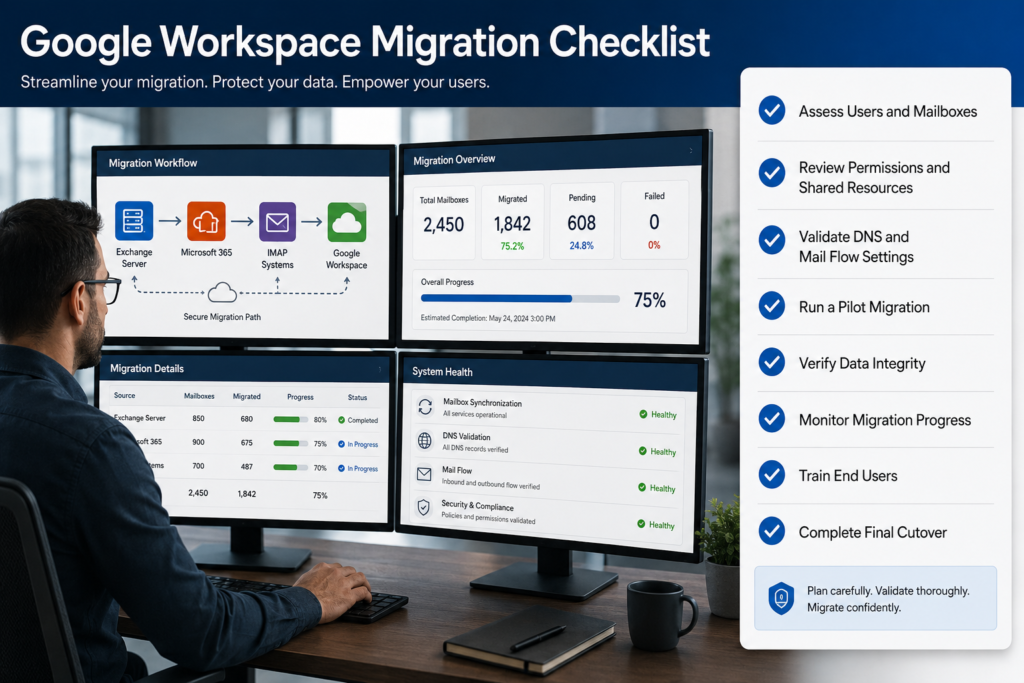
Step-by-Step Approach to a Successful Google Workspace Migration
The most successful projects follow a structured methodology.
Step 1: Assess the Existing Environment
Document:
- User accounts
- Mailbox sizes
- Shared mailboxes
- Distribution groups
- Permissions
- Calendar resources
This assessment becomes the foundation of migration planning.
Step 2: Define Project Objectives
Establish clear goals.
Examples:
- Reduce infrastructure costs
- Improve collaboration
- Enable remote work
- Modernize email systems
Well-defined objectives guide technical decisions.
Step 3: Select the Right Migration Tool
Migration complexity often determines tool selection.
A capable Google Workspace Migration Tool should support:
- Incremental migration
- Automatic mailbox mapping
- Error reporting
- Large mailbox handling
- Secure authentication
Tool selection can significantly impact project success.
Step 4: Prepare the Target Environment
Before moving data:
- Create user accounts
- Configure security policies
- Verify domain ownership
- Configure administrative settings
Preparation reduces migration-related issues.
Step 5: Run a Pilot Migration
A pilot migration identifies potential problems before large-scale deployment.
Select a small group of users representing different departments and workloads.
Evaluate:
- Data accuracy
- Mail flow
- User experience
- Performance
Step 6: Execute Production Migration
After successful testing:
- Schedule migration waves
- Communicate timelines
- Monitor progress
- Track errors
Incremental migration approaches often minimize disruption.
Step 7: Validate Data Integrity
Verify:
- Emails
- Attachments
- Calendars
- Contacts
- Folder structures
Validation ensures users receive complete and accurate data.
Step 8: Complete Cutover and Support
Following migration:
- Update DNS records
- Verify mail flow
- Provide user assistance
- Monitor system performance
The post-migration period is critical for user satisfaction.
Best Practices IT Teams Should Follow
Organizations that consistently achieve successful outcomes typically follow several best practices.
Start Planning Early
Migration planning should begin weeks or months before implementation.
Early planning reduces unexpected complications.
Clean Up Data Before Migration
Remove:
- Obsolete accounts
- Duplicate mailboxes
- Unnecessary data
Smaller migration scopes improve efficiency.
Communicate Frequently
Keep stakeholders informed throughout the project.
Provide:
- Status updates
- Training resources
- Migration schedules
Clear communication minimizes resistance and confusion.
Test Everything
Validate:
- Authentication
- Mail flow
- Permissions
- User access
Testing is significantly less expensive than troubleshooting production issues.
Maintain Rollback Plans
Every migration project should include contingency procedures.
Rollback planning reduces risk if unexpected problems occur.
Monitor Continuously
Track:
- Migration progress
- Error logs
- User feedback
- Performance metrics
Early detection enables faster resolution.
Why EdbMails for Google Workspace Migration?
Organizations seeking greater flexibility often look beyond native migration utilities and evaluate specialized migration platforms.
EdbMails provides migration capabilities designed to support various scenarios involving:
- Google Workspace
- Microsoft 365
- Exchange Server
- IMAP platforms
Its migration functionality includes:
- Automated mailbox migration
- Incremental migration support
- Secure authentication methods
- Folder hierarchy preservation
- Large mailbox handling
- Detailed migration reporting
For businesses planning a Google Workspace Migration, having visibility into migration progress and maintaining data integrity throughout the process can significantly simplify project execution.
Whether the requirement involves a traditional G Suite Migration, a transition to Microsoft 365, Exchange Server, or another cloud platform, choosing a migration solution that minimizes complexity can help IT teams reduce administrative effort and migration risk.
Frequently Asked Questions
1. What is the biggest challenge during a Google Workspace Migration?
The most common challenge is inadequate planning. Many organizations underestimate data complexity, user dependencies, and permission structures.
2. How long does a Google Workspace Migration take?
Migration timelines vary depending on:
- Number of users
- Mailbox sizes
- Internet bandwidth
- Migration methodology
Small projects may take days, while enterprise migrations can require several weeks.
3. Can users continue working during migration?
Yes. Many modern migration approaches support coexistence and incremental synchronization, allowing users to remain productive throughout the process.
4. What data can be migrated to Google Workspace?
Typically, organizations can migrate:
- Emails
- Contacts
- Calendars
- Attachments
- User accounts
- Folder structures
Capabilities depend on the selected migration tool.
5. Is a Google Workspace Migration Tool necessary?
For small environments, native tools may be sufficient. Larger organizations often benefit from a dedicated Google Workspace Migration Tool that provides automation, reporting, and advanced migration controls.
6. What is the difference between Google Workspace Migration and G Suite Migration?
There is no functional difference. Google rebranded G Suite as Google Workspace in 2020. The terms are often used interchangeably.
7. Should organizations perform a pilot migration first?
Yes. Pilot migrations help identify technical issues, validate procedures, and reduce deployment risks before production rollout.
8. How can organizations reduce migration risks?
Risk reduction strategies include:
- Detailed assessments
- Pilot testing
- Incremental migration
- User training
- Continuous monitoring
- Reliable migration tools
Conclusion
A first-time G Suite Migration (Google Workspace Migration) often teaches IT teams lessons that only become obvious after the project begins. From user assessments and mailbox inventories to DNS planning and post-migration validation, success depends on preparation rather than execution alone.
Organizations that approach migration strategically are far more likely to achieve a seamless transition while minimizing downtime, user disruption, and unexpected technical challenges. Thorough planning, testing, stakeholder communication, and ongoing monitoring remain the most important factors in any migration project.
For businesses evaluating migration options, solutions such as EdbMails can help simplify complex migration scenarios involving Google Workspace, Microsoft 365, Exchange Server, and IMAP platforms while supporting secure and efficient data transfer. Ultimately, the goal is not merely to move data but to ensure users can continue working productively from day one in their new environment.