As businesses continue to embrace cloud-based technologies, Office 365 migration has become an important step in modernizing communication and collaboration systems. Moving from on-premises email servers or legacy platforms to Microsoft 365 offers numerous benefits, including improved accessibility, enhanced security, automatic updates, and better scalability.
However, a successful migration requires careful planning and execution. Businesses must ensure that emails, contacts, calendars, and other critical data are transferred securely without disrupting daily operations. During my research on migration strategies, I found that many organizations rely on specialized migration solutions such as EdbMails.
This guide covers everything businesses need to know before starting an Office 365 migration project.
What Is Office 365 Migration?
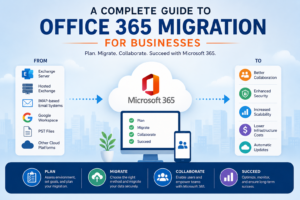
Office 365 Migration is the process of moving email mailboxes, user accounts, contacts, calendars, and other organizational data from an existing environment to Microsoft 365. The source environment may include:
- Microsoft Exchange Server
- Hosted Exchange
- IMAP-based email systems
- Google Workspace
- PST files
- Other cloud platforms
The goal is to centralize communication and improve productivity through Microsoft’s cloud ecosystem.
Benefits of Migrating to Office 365
Improved Accessibility
Employees can access emails, documents, and collaboration tools from virtually any device with an internet connection.
Enhanced Security
Microsoft 365 includes advanced security features such as multi-factor authentication, threat protection, and compliance tools that help protect business data.
Reduced Infrastructure Costs
Organizations can reduce expenses related to maintaining physical servers and hardware.
Scalability
Businesses can easily add or remove users as organizational needs change.
Automatic Updates
Microsoft regularly updates services, ensuring access to the latest features and security enhancements.
Common Challenges During Migration
Although Office 365 Migration offers many advantages, organizations may face several challenges:
Data Loss Risks
Improper migration procedures can result in missing emails, corrupted mailbox items, or incomplete transfers.
Downtime Concerns
Business operations can be affected if users lose access to email services during migration.
Large Mailbox Sizes
Organizations with extensive mailbox data often experience longer migration times.
Permission and Configuration Issues
Shared mailboxes, public folders, and mailbox permissions may require additional attention during the migration process.
Planning an Office 365 Migration
A well-planned migration significantly increases the likelihood of success.
Assess the Existing Environment
Identify:
- Number of mailboxes
- Mailbox sizes
- User requirements
- Existing email platform
- Network readiness
Define Migration Goals
Determine what data needs to be migrated and establish timelines for completion.
Create Backup Copies
Always maintain backups before starting any migration activity to minimize risk.
Inform Users
Communicate migration schedules, expected changes, and support procedures to employees.
Office 365 Migration Methods
Cutover Migration
Suitable for smaller organizations that want to migrate all mailboxes at once.
Staged Migration
Allows businesses to move users in batches, making it easier to manage larger projects.
Hybrid Migration
Provides coexistence between on-premises Exchange and Microsoft 365 environments during migration.
IMAP Migration
Used primarily for migrating email data from non-Exchange email systems.
Best Practices for a Successful Migration
- Perform a pilot migration before moving all users.
- Clean up unnecessary data before migration.
- Verify mailbox permissions and shared resources.
- Monitor migration progress closely.
- Test migrated mailboxes thoroughly.
- Provide user training after migration.
Following these practices can help reduce disruptions and improve the overall migration experience.
Choosing the Right Migration Solution
Businesses often evaluate migration tools based on factors such as reliability, speed, ease of use, and support for different source environments. Depending on organizational requirements, solutions such as EdbMails and the Office 365 Migration Tool may help automate mailbox transfers and simplify administrative tasks.
The right solution should support secure data transfer, comprehensive migration options, and detailed reporting capabilities.
Post-Migration Checklist
After migration is complete:
- Verify mailbox accessibility.
- Confirm email flow functionality.
- Test calendars and contacts.
- Validate shared mailbox permissions.
- Review migration reports.
- Train users on Microsoft 365 features.
- Monitor system performance.
These steps help ensure a smooth transition and long-term success.
Conclusion
Office 365 Migration is an important step for businesses seeking greater flexibility, security, and productivity. While the migration process can appear complex, proper planning, testing, and execution can significantly reduce risks and downtime.
Organizations that take the time to assess their environment, choose an appropriate migration strategy, and follow best practices are more likely to achieve a successful transition. Whether using native methods or specialized migration solutions such as EdbMails, the primary focus should always be on protecting business data and ensuring a seamless experience for end users.