As organizations continue to embrace cloud-based productivity solutions, Office 365 Migration has become a common step in modernizing business communication and collaboration. Moving mailboxes, contacts, calendars, and other data to Microsoft 365 can offer improved accessibility, enhanced security, and better scalability.
However, a successful migration requires careful planning. Without a clear strategy, organizations may face downtime, data loss, or user disruption. During my research into migration solutions, I came across several tools designed to simplify the process, including EdbMails, which many administrators use to manage mailbox migrations more efficiently.
This article explores the key steps involved in planning a successful Office 365 Migration Software.
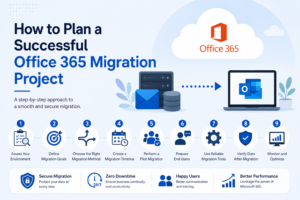
1. Assess Your Existing Environment
Before starting the migration, conduct a thorough assessment of your current email infrastructure. Identify:
- The number of mailboxes to migrate
- Mailbox sizes and storage requirements
- Shared mailboxes and public folders
- Existing email platforms such as Exchange Server or IMAP services
- Network and internet bandwidth availability
A detailed assessment helps determine the most suitable migration approach and timeline.
2. Define Migration Goals
Every organization has unique requirements. Establish clear objectives before beginning the project.
Common goals include:
- Reducing infrastructure maintenance costs
- Improving email accessibility for remote users
- Enhancing data security and compliance
- Consolidating multiple email systems
Defining goals early helps stakeholders understand the expected outcomes of the Office 365 Migration process.
3. Choose the Right Migration Method
Microsoft offers multiple migration methods depending on your environment and business size.
Popular options include:
- Cutover Migration
- Staged Migration
- Hybrid Migration
- IMAP Migration
Selecting the appropriate method ensures minimal disruption and a smoother transition for end users.
4. Create a Migration Timeline
Develop a realistic project schedule that includes:
- Planning and preparation
- Pilot testing
- Data migration
- User validation
- Post-migration support
Breaking the project into manageable phases reduces risk and allows teams to address issues before they affect the entire organization.
5. Perform a Pilot Migration
Testing a small group of users before a full-scale migration is highly recommended.
A pilot migration helps:
- Identify potential issues
- Validate migration settings
- Estimate migration speed
- Gather user feedback
This step can significantly improve the success rate of the final migration.
6. Prepare End Users
User communication is often overlooked during Office 365 Migration projects.
Inform employees about:
- Migration schedules
- Expected downtime
- Login procedures
- New features and changes
Providing training resources can improve user adoption and reduce support requests after migration.
7. Use Reliable Migration Tools
While native migration methods are available, many organizations choose specialized tools to simplify complex migration scenarios.
Solutions such as EdbMails can help automate mailbox transfers, reduce administrative effort, and support migrations from various email platforms to Microsoft 365. Choosing a reliable migration tool can save time and improve overall project efficiency.
8. Verify Data After Migration
Once the migration is complete, verify that all data has been transferred successfully.
Check:
- Emails
- Contacts
- Calendars
- Folder structures
- Permissions
Validation ensures that users can continue working without missing critical information.
9. Monitor and Optimize
Migration does not end once the data is moved. Continue monitoring performance and user feedback.
Review:
- Mail flow functionality
- Security settings
- User access permissions
- Storage utilization
Ongoing monitoring helps maintain a stable and secure Microsoft 365 environment.
Conclusion
A successful Office 365 Migration project requires careful planning, testing, and execution. By assessing your environment, selecting the right migration method, preparing users, and validating migrated data, organizations can minimize disruptions and achieve a smooth transition to Microsoft 365.
Many IT administrators also evaluate specialized migration solutions such as EdbMails to streamline complex migration tasks and improve project efficiency. With proper preparation and the right approach, businesses can fully benefit from the flexibility and scalability that Microsoft 365 offers.
Frequently Asked Questions
1. What is Office 365 Migration?
Office 365 Migration is the process of moving emails, contacts, calendars, and other mailbox data from an existing email system to Microsoft 365.
2. How long does an Office 365 Migration take?
The duration depends on factors such as mailbox size, number of users, internet bandwidth, and the migration method used.
3. Can users access their emails during migration?
In many migration scenarios, users can continue accessing their mailboxes with minimal interruption, especially when proper planning and scheduling are implemented.
4. Why do organizations use migration tools like EdbMails?
EdbMails can simplify data transfers, automate migration tasks, reduce manual effort, and support various source environments when moving data to Microsoft 365.