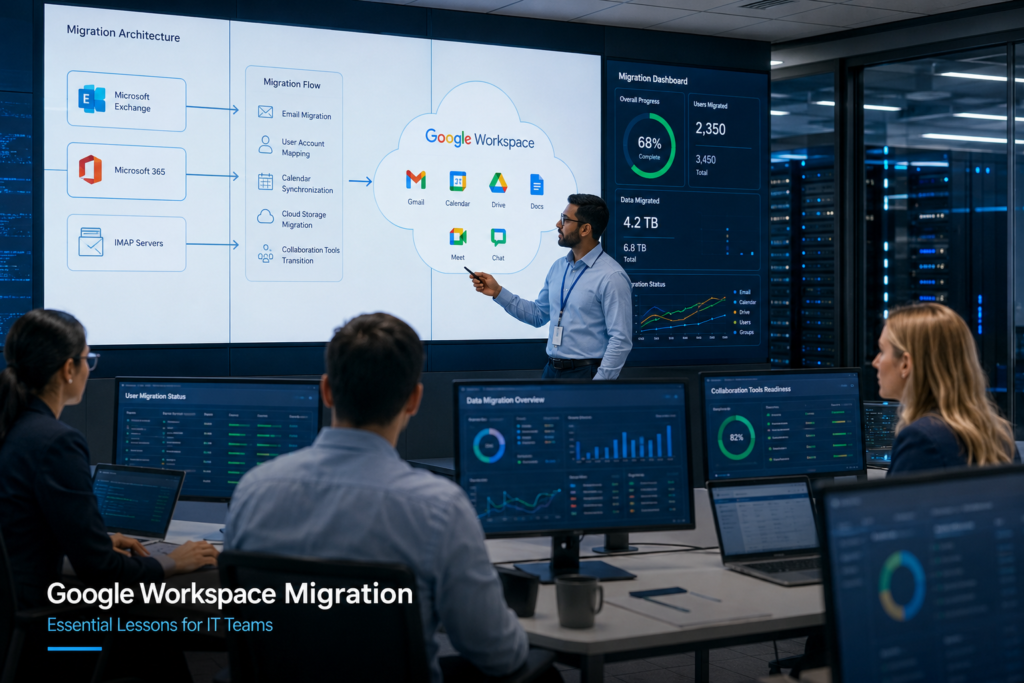
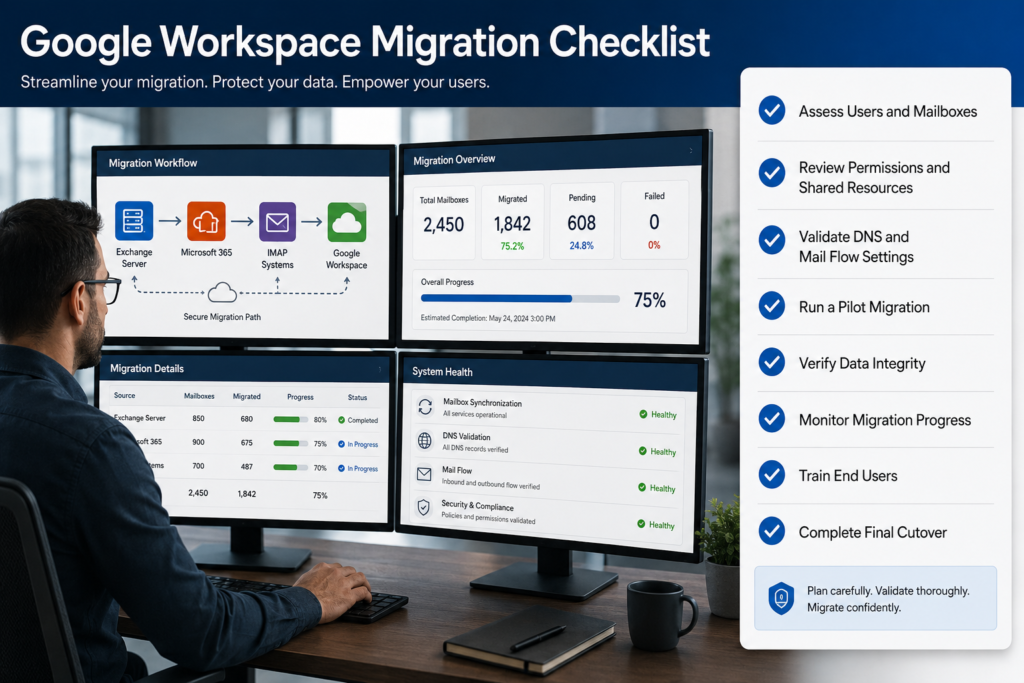
Authentication is one of the most critical components of any Google Workspace Migration project. Whether an organization is migrating from Microsoft Exchange, Microsoft 365, IMAP servers, hosted email platforms, or another Google Workspace tenant, the migration process relies heavily on secure authentication mechanisms to access source and destination mailboxes.
When authentication problems occur, migrations can slow down, fail unexpectedly, or stop completely. Administrators often spend considerable time diagnosing permission errors, OAuth failures, API restrictions, service account issues, and multi-factor authentication conflicts before data can be successfully transferred.
As organizations increasingly adopt cloud-based collaboration platforms, understanding authentication-related challenges has become essential for successful migration planning. Proper troubleshooting not only reduces migration downtime but also minimizes security risks and user disruption.
This guide explains common authentication issues encountered during Google Workspace Migration, their causes, practical troubleshooting methods, and best practices for preventing them.
What Is Authentication in Google Workspace Migration?
Authentication is the process of verifying the identity of users, applications, or services attempting to access Google Workspace resources.
During a migration, authentication allows migration software to:
- Access user mailboxes
- Read emails and folders
- Transfer contacts
- Migrate calendars
- Upload data to destination accounts
- Validate administrative permissions
Modern migration projects typically use:
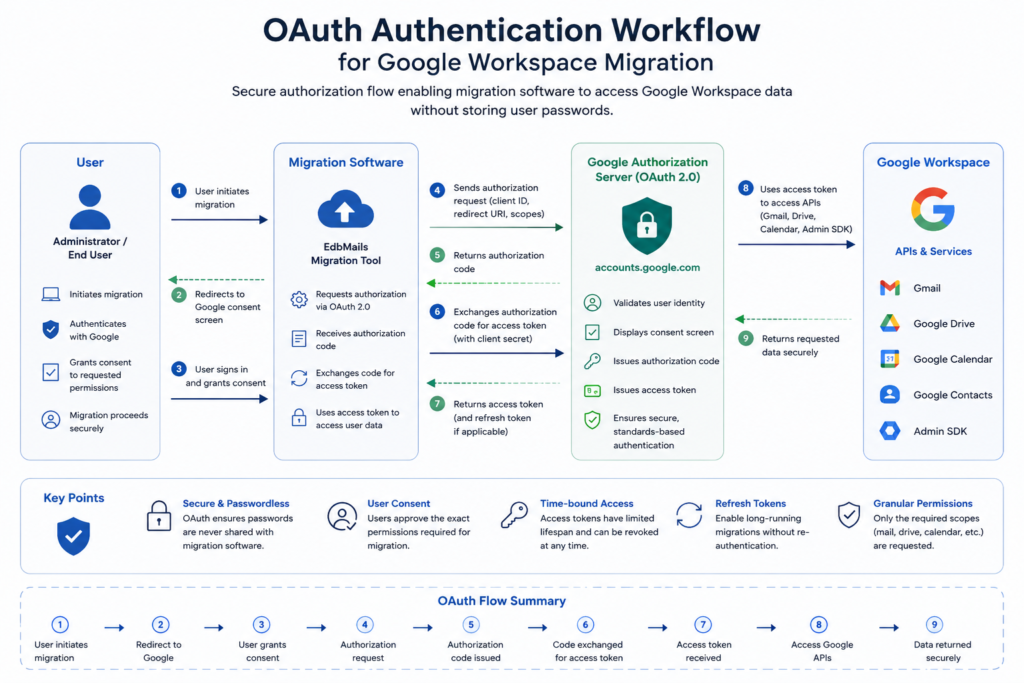
OAuth 2.0 Authentication
OAuth is Google’s recommended authentication framework. Instead of storing user passwords, applications receive secure access tokens after authorization.
Benefits include:
- Enhanced security
- Reduced password exposure
- Granular permissions
- Easier compliance management
Service Account Authentication
Large-scale enterprise migrations often use Google service accounts with domain-wide delegation.
Advantages include:
- Centralized administration
- Reduced user involvement
- Scalability for bulk migrations
- Better automation capabilities
Legacy Authentication Methods
Some older migration tools rely on direct username/password authentication.
While simpler initially, these methods often face restrictions due to modern security policies.
Business Value of Resolving Authentication Issues Early
Authentication problems are often underestimated during migration planning.
Organizations that proactively address authentication requirements gain several benefits.
Reduced Migration Downtime
Proper authentication configuration prevents unexpected migration interruptions.
Improved Security
Secure authentication methods protect sensitive business data throughout the migration lifecycle.
Faster Project Completion
Migration batches run more smoothly when permission-related issues are resolved beforehand.
Better User Experience
Employees experience fewer delays when mailbox access and synchronization work correctly.
Lower Administrative Overhead
IT teams spend less time troubleshooting failed migration jobs and more time focusing on strategic tasks.
Common Authentication Scenarios During Google Workspace Migration
Different migration projects involve different authentication requirements.
Microsoft 365 to Google Workspace
Administrators often encounter:
- OAuth permission issues
- Conditional access restrictions
- MFA conflicts
- Application consent limitations
Exchange Server to Google Workspace
Common challenges include:
- Service account permissions
- Impersonation rights
- Hybrid authentication complexities
IMAP-Based Migration
Typical authentication problems include:
- Invalid credentials
- Blocked login attempts
- Authentication protocol mismatches
Google Workspace to Google Workspace Migration
Cross-tenant migrations frequently involve:
- Domain-wide delegation setup
- OAuth consent configuration
- API access permissions
Large Enterprise Migrations
Organizations migrating thousands of users often face:
- API throttling
- Token expiration
- Security policy conflicts
- Identity synchronization issues
Common Authentication Challenges and Risks
Understanding potential issues helps administrators identify root causes more quickly.
OAuth Consent Errors
OAuth authorization failures are among the most common migration obstacles.
Typical error messages include:
- Access denied
- Authorization failed
- Invalid scope
- Insufficient permissions
Causes
- Incorrect OAuth scopes
- Missing administrator consent
- Application restrictions
- Expired authorization tokens
Resolution
- Review configured OAuth scopes
- Reauthorize the migration application
- Verify administrator approval
- Confirm Google API access settings
Multi-Factor Authentication (MFA) Conflicts
Many organizations enforce MFA for security compliance.
Migration applications may fail if MFA requirements are not properly addressed.
Symptoms
- Login failures
- Repeated authentication prompts
- Account lockouts
Resolution
- Use OAuth-based authentication whenever possible
- Verify MFA-compatible authentication methods
- Configure application-specific access where permitted
- Follow Google security recommendations
Service Account Configuration Errors
Service accounts are commonly used in enterprise-scale migrations.
Misconfigurations can prevent mailbox access.
Common Issues
- Incorrect service account setup
- Missing domain-wide delegation
- Insufficient privileges
- Invalid private keys
Resolution
- Verify service account creation
- Enable domain-wide delegation
- Confirm required API scopes
- Test mailbox access before production migration
API Access Restrictions
Google Workspace relies heavily on APIs during migration.
Restricted API access can prevent migration tools from functioning correctly.
Causes
- Disabled APIs
- Security policy restrictions
- Organizational unit limitations
- Third-party app controls
Resolution
- Verify API activation
- Review Workspace security settings
- Allow trusted migration applications
- Test API connectivity
Token Expiration Problems
OAuth tokens eventually expire.
Long-running migrations may experience interruptions if token refresh processes fail.
Symptoms
- Unexpected migration stoppage
- Authentication timeouts
- Session expiration errors
Resolution
- Reauthenticate migration sessions
- Verify refresh token permissions
- Update migration software
- Monitor long-running migration batches
Account Lockouts
Repeated failed login attempts may trigger account protection mechanisms.
Common Causes
- Incorrect passwords
- Misconfigured migration profiles
- Automated retry loops
Resolution
- Reset credentials if necessary
- Verify account status
- Review security alerts
- Correct configuration issues before retrying

Step-by-Step Troubleshooting Process
A structured approach significantly improves troubleshooting efficiency.
Step 1: Review Migration Logs
Always begin with migration logs.
Look for:
- Authentication failures
- OAuth errors
- Permission denials
- API response codes
Logs often reveal the exact point of failure.
Step 2: Validate Administrative Permissions
Confirm that the account performing migration has appropriate access.
Verify:
- Google Workspace administrator roles
- Delegated permissions
- Service account privileges
- API authorization rights
Step 3: Verify API Configuration
Check required APIs within Google Cloud and Google Workspace environments.
Confirm:
- Gmail API enabled
- Admin SDK enabled
- Calendar API enabled
- Contacts API enabled when applicable
Step 4: Test OAuth Authentication
Perform a fresh OAuth authorization.
Review:
- Consent screen configuration
- Scope assignments
- Administrator approvals
- Token generation
Step 5: Examine Security Policies
Review organizational security controls.
Pay attention to:
- MFA requirements
- Context-aware access policies
- Application restrictions
- Third-party app access controls
Step 6: Test a Small Migration Batch
Before migrating all users:
- Select a few test mailboxes
- Validate connectivity
- Confirm data transfer success
- Review migration reports
Pilot migrations frequently expose authentication issues early.
Step 7: Monitor Real-Time Migration Activity
Observe migration performance continuously.
Track:
- Failed items
- Authentication retries
- Token refresh events
- API throttling warnings
Proactive monitoring prevents larger disruptions.
Best Practices for Preventing Authentication Issues
Experienced administrators typically follow several proven practices.
Use OAuth Instead of Basic Authentication
OAuth provides stronger security and better compatibility with Google’s modern authentication framework.
Configure Service Accounts Properly
For enterprise migrations:
- Enable domain-wide delegation
- Assign least-privilege permissions
- Test delegation before migration
Perform Pre-Migration Assessments
Assess:
- Security policies
- API readiness
- Administrative permissions
- Identity configurations
Pre-migration validation reduces project risks.
Maintain Documentation
Document:
- OAuth scopes
- Service account settings
- API configurations
- Security exceptions
Accurate documentation simplifies troubleshooting.
Conduct Pilot Migrations
Small pilot migrations identify authentication issues before they impact large user populations.
Monitor Security Changes
Google Workspace security settings evolve over time.
Regularly review:
- Authentication policies
- API restrictions
- OAuth requirements
- Administrative controls
Why EdbMails for Google Workspace Migration?
Authentication complexity is one of the primary reasons migration projects encounter delays.
A reliable Google Workspace Migration Tool should simplify authentication management while maintaining security and compliance.
EdbMails is designed to support secure migration scenarios by offering:
- OAuth-based authentication support
- Secure mailbox access methods
- Incremental migration capabilities
- Detailed migration reporting
- Automated mapping options
- Support for large-scale migration projects
Organizations performing G Suite Migration projects often benefit from tools that provide clear error reporting and streamlined authentication workflows, helping administrators identify and resolve issues more efficiently.
Additionally, businesses evaluating a G Suite Migration Tool should consider factors such as security architecture, permission management, scalability, and vendor support to ensure successful migration outcomes.
Frequently Asked Questions
1. Why does Google Workspace Migration fail due to authentication errors?
Authentication failures typically occur because of incorrect permissions, OAuth configuration issues, expired tokens, API restrictions, or security policies such as MFA requirements.
2. Is OAuth required for Google Workspace Migration?
While some legacy methods exist, OAuth is Google’s recommended authentication approach because it provides stronger security and better compatibility with modern environments.
3. What is domain-wide delegation?
Domain-wide delegation allows a service account to access user mailboxes across a Google Workspace domain without requiring individual user authorization.
4. Can MFA cause migration failures?
Yes. Improperly configured MFA settings can prevent migration tools from authenticating successfully. OAuth-based authentication generally provides the best compatibility.
5. How can I identify the root cause of authentication problems?
Review migration logs, API responses, security alerts, and administrator audit reports. These sources typically provide detailed error information.
6. What APIs are commonly required during migration?
Depending on migration requirements, organizations may need Gmail API, Google Calendar API, Contacts API, and Admin SDK access.
7. Should I perform a pilot migration before full deployment?
Absolutely. Pilot migrations help identify authentication, permission, and configuration issues before they affect large-scale migration projects.
8. What role do migration tools play in authentication management?
A quality migration solution helps simplify OAuth authorization, permission validation, error reporting, and migration monitoring, reducing administrative complexity.
Conclusion
Authentication is often the foundation of a successful Google Workspace Migration project. Even the most carefully planned migration can encounter delays when OAuth permissions, service accounts, API access, MFA policies, or security controls are not properly configured.
By understanding common authentication challenges, conducting thorough pre-migration assessments, validating permissions, and following structured troubleshooting procedures, organizations can significantly reduce migration risks and improve project outcomes.
Whether you’re planning a small departmental migration or a large enterprise deployment, investing time in authentication readiness helps ensure secure, efficient, and reliable data transfers. Solutions such as EdbMails can further simplify the migration process by providing secure authentication support, detailed reporting, and migration management capabilities that help administrators navigate complex migration environments with confidence.