Planning an Office 365 Migration is one of the most important decisions an IT team makes during cloud adoption. While Microsoft provides several migration options, selecting the wrong approach can increase downtime, complicate user onboarding, and create unnecessary administrative work.
Every organization has unique requirements. A small business with fewer than 100 mailboxes has different migration needs than a multinational enterprise running multiple Exchange servers across different locations. Factors such as mailbox size, Exchange version, coexistence requirements, project timeline, compliance policies, and available IT resources all influence which migration strategy is most appropriate.
Before starting any migration, it’s important to understand the available Office 365 migration methods and choose the one that matches your environment. Selecting the right method from the beginning helps reduce migration risks, improve user experience, and simplify project management.
This guide explains the four primary migration strategies available for Microsoft 365:
- Cutover Migration
- Staged Migration
- Hybrid Migration
- IMAP Migration
You’ll also learn where each method works best, its advantages, limitations, and how an Office 365 Migration Tool can simplify complex migration projects.
What is Office 365 Migration?
Office 365 Migration is the process of moving email data, mailboxes, calendars, contacts, tasks, and other collaboration resources from an existing email environment into Microsoft 365.
Organizations migrate from various platforms, including:
- Microsoft Exchange Server
- Older Exchange environments
- Microsoft 365 tenants
- Hosted Exchange providers
- Google Workspace
- IMAP-based email servers
- POP3-based environments (via supported migration methods)
Migration is much more than copying mailbox content. A successful migration project involves careful planning, user provisioning, DNS updates, permissions, mailbox validation, coexistence planning, and post-migration verification.
Depending on the existing infrastructure, Microsoft supports different migration approaches, each designed for specific business scenarios.
Benefits of Choosing the Right Migration Strategy
Selecting an appropriate migration approach offers several operational and business advantages.
Reduced Downtime
A well-planned migration minimizes service interruptions, allowing employees to continue working with minimal disruption.
Better User Experience
Users can continue accessing their email with fewer interruptions when migrations are scheduled and executed correctly.
Lower Administrative Effort
Choosing the right migration strategy reduces manual intervention, troubleshooting, and post-migration corrections.
Improved Data Integrity
Proper planning helps ensure mailbox content, folders, calendars, and contacts are migrated accurately.
Easier Project Management
Clear migration phases make scheduling, monitoring, and validating migrations more manageable for IT teams.
Scalability
Organizations can migrate hundreds or thousands of mailboxes efficiently using the appropriate migration model and reliable Office 365 Migration Software.
Common Migration Scenarios
Every organization has different migration goals. Below are some common examples.
Small Businesses
Typically:
- Less than 150 users
- Single Exchange Server
- Limited IT staff
- Short migration window
Cutover Migration is often considered for these environments.
Growing Organizations
Characteristics include:
- Multiple departments
- Several hundred mailboxes
- Need for phased migration
- Minimal business disruption
Staged migration or modern migration solutions are often more suitable.
Large Enterprises
Large organizations often require:
- Thousands of users
- Multiple Exchange Servers
- Compliance requirements
- Long-term coexistence
- Hybrid identity
Hybrid Migration usually provides the flexibility needed for these environments.
Organizations Migrating from Other Email Platforms
Businesses using:
- Linux mail servers
- Dovecot
- Courier
- cPanel email
- Zimbra
- Generic IMAP services
can use IMAP Migration tool to transfer mailbox content into Microsoft 365.
Mergers and Acquisitions
Organizations combining multiple email systems often require staged project planning, coexistence, and incremental mailbox migrations to minimize disruption.
Modernization Projects
Many businesses migrate to Microsoft 365 to:
- Reduce on-premises infrastructure
- Improve security
- Enable remote work
- Simplify administration
- Adopt Microsoft Teams and other cloud services
The migration method selected should align with both technical requirements and long-term business goals.
Understanding Cutover, Staged, Hybrid, and IMAP Migration Methods
Once you’ve assessed your organization’s size, existing email platform, and business goals, the next step is understanding how each migration method works. Each option has its own strengths, limitations, and ideal use cases.
Cutover Migration
A Cutover Migration moves all supported mailboxes from an on-premises Microsoft Exchange Server to Microsoft 365 in a single migration event. Rather than migrating users in phases, the entire organization transitions to Microsoft 365 at once.
This approach is generally best suited for smaller organizations with straightforward Exchange environments and limited mailbox counts.
How It Works
The typical Cutover migration process includes:
- Verify your domain in Microsoft 365.
- Prepare user accounts and licenses.
- Configure the migration endpoint.
- Start the migration batch.
- Synchronize mailbox data.
- Update DNS records (such as MX and Autodiscover).
- Complete the migration and switch users to Microsoft 365.
Once the migration is finalized and DNS changes propagate, users begin accessing their new Microsoft 365 mailboxes.
Advantages
- Simple migration process
- Single migration project
- Faster overall completion
- Minimal coexistence management
- Easier administration for smaller organizations
Limitations
- Requires careful planning because all users move together
- Limited flexibility for phased rollouts
- Larger organizations may experience longer migration windows
- User communication and scheduling are critical
Best Use Cases
A Cutover Migration is typically suitable when:
- Your organization has a relatively small number of mailboxes.
- All users can transition during the same maintenance window.
- You want to retire the on-premises Exchange environment soon after migration.
- There is no requirement for long-term coexistence between Exchange Server and Microsoft 365.
Example
A company with approximately 60 employees running a single Exchange Server decides to move to Microsoft 365 over a weekend. After completing mailbox synchronization and updating DNS records, employees begin using Outlook with Microsoft 365 on Monday morning with minimal disruption.
Staged Migration
A Staged Migration allows organizations to move mailboxes in multiple batches instead of migrating everyone simultaneously. This phased approach provides more flexibility for businesses that need to spread the migration across weeks or months.
Rather than switching every department at once, IT administrators can migrate users based on business units, office locations, or project schedules.
How It Works
A staged migration generally follows these steps:
- Prepare the Microsoft 365 tenant.
- Synchronize identities where applicable.
- Create migration batches.
- Migrate a selected group of users.
- Validate mailbox functionality.
- Continue with additional migration batches.
- Complete the project after all users are migrated.
Advantages
- Reduced business disruption
- Easier troubleshooting
- Lower migration risk
- Better control over scheduling
- Allows pilot migrations before organization-wide deployment
Limitations
- Longer project duration
- More administrative oversight
- Temporary coexistence may need to be managed
- Multiple migration batches require monitoring
Best Use Cases
Staged Migration works well for organizations that:
- Have several hundred users.
- Want to migrate one department at a time.
- Need time to train employees.
- Prefer gradual adoption of Microsoft 365.
- Have limited maintenance windows.
Example
A manufacturing company with 600 employees migrates its finance department first, followed by human resources, sales, operations, and executive teams over several weeks. Each migration batch is validated before moving on to the next group.
Hybrid Migration
A Hybrid Migration establishes a coexistence environment between an on-premises Exchange Server and Microsoft 365. Both environments operate together during the migration, allowing organizations to move mailboxes gradually while maintaining a seamless user experience.
Hybrid deployments are commonly used by medium and large enterprises that require advanced functionality during migration.
How It Works
A Hybrid Migration typically involves:
- Preparing the Exchange Server environment.
- Configuring Microsoft 365.
- Setting up directory synchronization.
- Establishing Hybrid connectivity.
- Validating mail flow.
- Migrating mailboxes in phases.
- Managing coexistence until migration is complete.
- Decommissioning on-premises infrastructure when appropriate.
Benefits
- Supports long-term coexistence
- Flexible mailbox migration scheduling
- Shared address book experience
- Consistent mail flow
- Reduced impact on end users
- Suitable for complex enterprise environments
Challenges
Hybrid deployments are more complex than Cutover or Staged migrations and typically require:
- Exchange administration expertise
- Careful planning
- Certificate management
- Identity synchronization
- Ongoing monitoring
- Thorough testing
Best Use Cases
Hybrid Migration is ideal for organizations that:
- Have thousands of users.
- Need coexistence between on-premises Exchange and Microsoft 365.
- Require gradual mailbox moves over an extended period.
- Must meet strict compliance or business continuity requirements.
- Need flexibility in migration scheduling.
Example
A multinational enterprise with 8,000 mailboxes migrates offices across different countries over several months. During the migration, users on both Exchange Server and Microsoft 365 can continue communicating seamlessly.
IMAP Migration
An Office 365 to IMAP Migration is designed for organizations moving email from IMAP-supported mail systems into Microsoft 365.
Unlike Exchange-based migrations, IMAP primarily transfers email messages. Other mailbox items such as calendars, contacts, tasks, notes, and permissions generally require separate migration methods or tools.
How It Works
The process generally includes:
- Create Microsoft 365 user accounts.
- Prepare IMAP credentials.
- Configure the migration endpoint.
- Import mailbox information.
- Synchronize email messages.
- Complete final synchronization.
- Update DNS records.
- Switch users to Microsoft 365.
Advantages
- Supports many IMAP-compatible email platforms
- Straightforward mailbox migration process
- Good option when moving from non-Exchange systems
- Relatively easy to configure
Limitations
IMAP Migration generally transfers:
- Email messages
- Folder structure
It typically does not migrate:
- Calendars
- Contacts
- Tasks
- Notes
- Shared mailbox permissions
- Exchange-specific configurations
Organizations requiring a more complete migration often use specialized Office 365 Migration Software to preserve additional mailbox data.
Best Use Cases
IMAP Migration is commonly used when migrating from:
- Linux mail servers
- Dovecot
- Courier
- cPanel email hosting
- Zimbra (IMAP mode)
- Generic hosted email providers
- Other IMAP-enabled mail services
Example
A business using a hosted Linux email server migrates employee email accounts to Microsoft 365. Email folders are transferred through IMAP, while contacts and calendars are migrated using a dedicated migration solution.
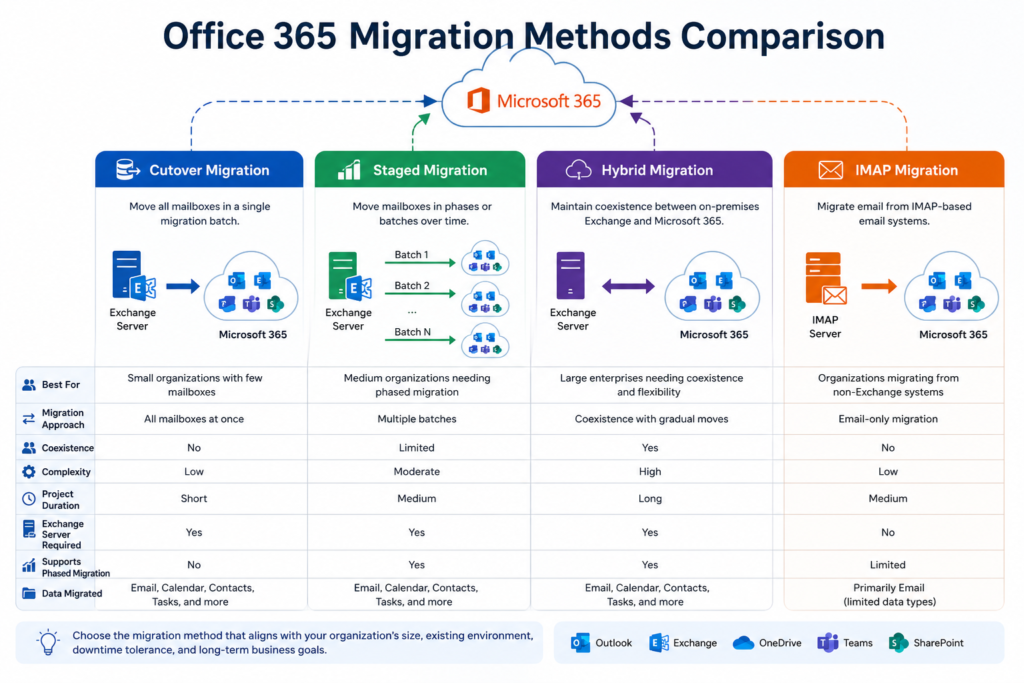
Comparison: Which Migration Strategy Fits Your Organization?
| Feature | Cutover | Staged | Hybrid | IMAP |
|---|---|---|---|---|
| Best for | Small businesses | Medium organizations | Large enterprises | Non-Exchange email systems |
| Migration approach | All users at once | Batch migration | Gradual coexistence | Email-only migration |
| Coexistence | No | Limited | Yes | No |
| Administrative complexity | Low | Moderate | High | Low |
| Project duration | Short | Medium | Long | Medium |
| Exchange Server required | Yes | Yes | Yes | No |
| Supports phased migration | No | Yes | Yes | Limited |
| Email migration | Yes | Yes | Yes | Yes |
| Calendars and contacts | Yes | Yes | Yes | Limited via native IMAP |
How to Choose the Right Office 365 Migration Strategy
Choosing the best Office 365 Migration method depends on several technical and business factors rather than organization size alone. Before deciding, evaluate the following:
Existing Email Platform
Determine whether you’re migrating from Microsoft Exchange, another Microsoft 365 tenant, Google Workspace, or an IMAP-based email system. Your source environment often dictates the available migration options.
Number of Mailboxes
A small organization may complete a Cutover Migration efficiently, while larger environments often benefit from Staged or Hybrid deployments that reduce operational risk.
Downtime Tolerance
If your business cannot accommodate extended service interruptions, phased migration methods provide greater flexibility and allow issues to be addressed before broader deployment.
Coexistence Requirements
Organizations that need on-premises Exchange and Microsoft 365 to operate together during the transition should consider a Hybrid approach.
IT Resources and Expertise
Some migration methods require advanced planning, identity synchronization, and Exchange administration skills. Ensure your IT team has the necessary experience or uses a trusted Office 365 Migration Tool to simplify the process.
Data to Be Migrated
If your project includes calendars, contacts, permissions, shared mailboxes, archives, or public folders, verify that your chosen migration method supports those workloads or plan to use specialized migration software where appropriate.
By aligning the migration strategy with your technical environment and business objectives, you can reduce risk, improve the user experience, and make the overall migration process significantly more manageable.
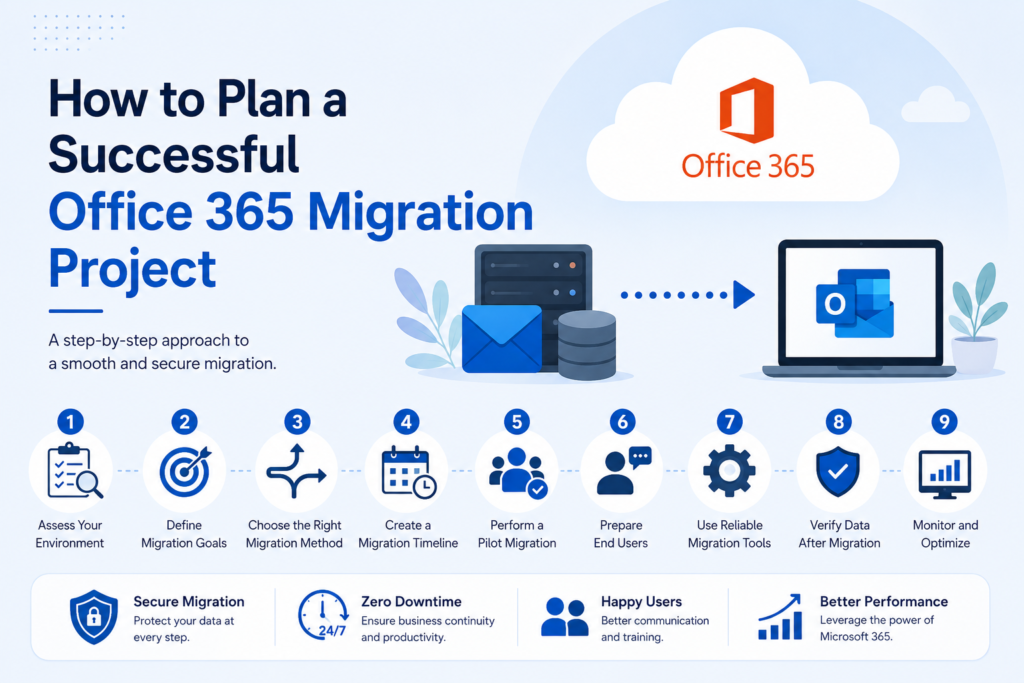
Best Practices for a Successful Office 365 Migration
Regardless of whether you choose Cutover, Staged, Hybrid, or IMAP, following proven migration practices can significantly reduce risk and help ensure a smooth transition to Microsoft 365.
1. Assess Your Existing Environment
Before migrating, perform a comprehensive assessment of your current email infrastructure. Document:
- Exchange Server version (if applicable)
- Number of mailboxes
- Mailbox sizes
- Shared mailboxes
- Distribution groups
- Public folders
- Archive mailboxes
- Email domains
- Network bandwidth
- Authentication methods
A thorough assessment helps identify potential compatibility issues before they impact the migration.
2. Choose the Right Migration Method
Avoid selecting a migration method based solely on organization size. Instead, evaluate:
- Business continuity requirements
- Project timeline
- User expectations
- Compliance policies
- Existing infrastructure
- Available IT resources
Taking the time to compare the different Office 365 migration methods helps ensure the chosen approach aligns with both technical and business requirements.
3. Run a Pilot Migration
Instead of migrating every user immediately, begin with a small pilot group.
A pilot migration allows administrators to:
- Validate mailbox functionality
- Confirm mail flow
- Test Outlook connectivity
- Verify mobile device synchronization
- Measure migration performance
- Identify unexpected issues
Addressing problems early minimizes the likelihood of widespread disruption during the full migration.
4. Clean Up Before Migrating
Migrating unnecessary data increases project duration and storage requirements.
Before migration:
- Remove inactive mailboxes
- Delete obsolete distribution groups
- Archive old emails if appropriate
- Eliminate duplicate data
- Review mailbox permissions
- Update user information
Cleaning the environment beforehand often results in a faster and more efficient migration.
5. Monitor Migration Progress
During migration, continuously monitor:
- Synchronization status
- Failed mailbox items
- Migration batch reports
- Network performance
- Mail flow
- User login activity
Proactive monitoring helps detect issues early and reduces post-migration troubleshooting.
6. Communicate with Users
Technical success alone doesn’t guarantee a successful migration. Keep employees informed by communicating:
- Migration schedule
- Expected downtime (if any)
- New login procedures
- Outlook profile changes
- Microsoft 365 feature updates
- Support contacts
Clear communication helps reduce confusion and support requests.
7. Verify Data After Migration
After each migration batch, validate that mailbox data has transferred successfully.
Verify:
- Email messages
- Folder hierarchy
- Calendar items
- Contacts
- Shared mailbox access
- Delegated permissions
- Mail flow
- Outlook connectivity
Encourage users to confirm their mailbox content before considering the migration complete.
8. Keep a Rollback and Backup Plan
Even well-planned migrations can encounter unexpected issues.
Before making final changes:
- Ensure recent backups are available.
- Document recovery procedures.
- Plan for DNS rollback if necessary.
- Maintain access to the source environment until validation is complete.
Having a contingency plan minimizes business risk.
Why Choose EdbMails for Office 365 Migration?
Native Microsoft migration methods are effective for many environments, but they may not always meet the needs of organizations with complex infrastructures, multiple migration scenarios, or requirements beyond standard mailbox transfers.
In such cases, using a dedicated Office 365 Migration methods can simplify planning and execution while providing additional flexibility.
EdbMails is designed to support a variety of migration scenarios, including Exchange Server to Microsoft 365, Microsoft 365 tenant-to-tenant migrations, IMAP migrations, and other supported workloads. Its guided interface helps administrators configure migration projects with less manual effort while offering detailed progress monitoring throughout the process.
Depending on the migration scenario, EdbMails provides capabilities such as:
- Support for multiple Office 365 migration scenarios
- Incremental migration to avoid reprocessing previously migrated data
- Selective mailbox and folder migration
- Automatic mailbox mapping where applicable
- Detailed migration reports and logs
- Batch migration support
- Preservation of mailbox folder structure
- Secure data transfer using Microsoft-supported authentication methods
- User-friendly interface suitable for both experienced administrators and IT teams with limited migration experience
Organizations evaluating Office 365 Migration Software should consider factors such as compatibility with their source environment, scalability, reporting capabilities, security, and ongoing vendor support. Choosing a solution that aligns with these requirements can help streamline migration projects and reduce administrative overhead.
Frequently Asked Questions
1. Which Office 365 migration method is best for small businesses?
For organizations with a relatively small number of Exchange mailboxes and a straightforward environment, a Cutover Migration is often a practical option because all supported mailboxes can be moved during a single migration project.
2. When should I choose a Hybrid Migration?
Hybrid Migration is generally recommended for medium to large organizations that require coexistence between on-premises Exchange Server and Microsoft 365. It allows mailboxes to be migrated gradually while maintaining integrated mail flow and collaboration between both environments.
3. Can IMAP Migration transfer calendars and contacts?
Native IMAP Migration primarily transfers email messages and folder structures. Calendars, contacts, tasks, and other Exchange-specific items usually require additional migration methods or specialized migration software.
4. How long does an Office 365 Migration take?
Migration duration depends on several factors, including:
- Number of mailboxes
- Mailbox sizes
- Internet bandwidth
- Source environment
- Migration method
- Network performance
- User scheduling
A small migration may complete within hours, while large enterprise projects can span several weeks or months.
5. Is downtime unavoidable during migration?
Not necessarily. Many migration strategies are designed to minimize disruption. With proper planning, phased migrations, synchronization, and carefully scheduled DNS changes, organizations can significantly reduce user downtime.
6. How do I choose between Cutover, Staged, Hybrid, and IMAP Migration?
The right choice depends on your current email platform, organization size, coexistence requirements, project timeline, and the types of data you need to migrate. Evaluating these factors before starting the project helps ensure the selected strategy aligns with your business and technical needs.
7. Why use an Office 365 Migration Tool instead of only native methods?
Native migration options are suitable for many scenarios, but organizations with larger or more complex environments may benefit from a dedicated migration tool that offers features such as incremental migration, advanced reporting, mailbox mapping, and simplified management.
Conclusion
Choosing the right Office 365 Migration strategy is one of the most important decisions in any Microsoft 365 deployment. While Cutover, Staged, Hybrid, and IMAP migrations all serve the same ultimate goal of moving users to Microsoft 365, each method is designed for different environments, technical requirements, and business objectives.
Smaller organizations may prefer the simplicity of a Cutover Migration, whereas businesses requiring phased deployments can benefit from Staged Migration. Enterprises that need long-term coexistence often rely on Hybrid Migration, while organizations moving from non-Exchange platforms can use IMAP Migration for supported email transfers.
Careful planning, pilot testing, user communication, and post-migration validation are essential regardless of the migration approach you choose. Understanding your existing infrastructure and selecting the appropriate migration methods for Office 365 can reduce risks, minimize downtime, and improve the overall migration experience.
For organizations looking for a streamlined migration experience, EdbMails Office 365 Migration Software provides a practical solution for a wide range of supported migration scenarios. With features such as incremental migration, detailed reporting, selective mailbox migration, and an intuitive interface, it can help IT administrators manage migration projects more efficiently while maintaining data integrity throughout the process.
Additional Resources